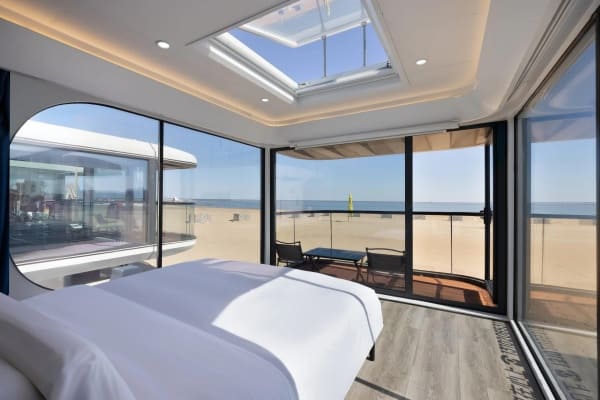
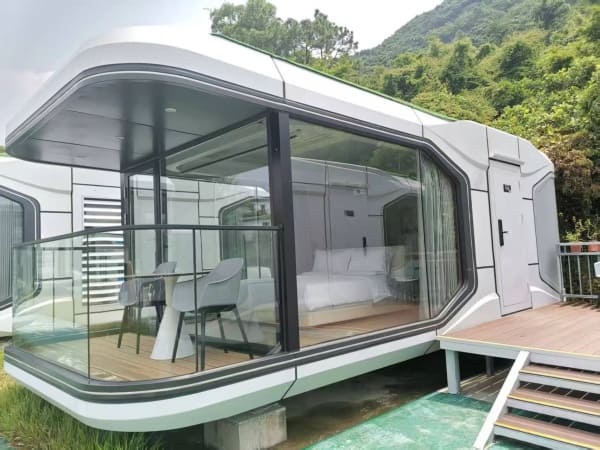
Nearly three-quarters of vacation rental hosts now offer self check-in—and for good reason. It saves time for both hosts and guests. You no longer need to wait around with keys, and guests avoid the stress of late arrivals. For capsule houses, the benefit is even greater because these units are designed for quick, private and efficient stays.
Self check-in simply means guests can enter and use a capsule house without meeting the host. By using a smart lock, keypad, or coded entry system, guests unlock the door independently. The process usually includes sharing a digital key or access code before arrival, along with clear instructions to keep the check-in and check-out smooth.
In this guide, you’ll learn the 5 essential steps to set up a reliable self check-in system for your Airbnb capsule house.
Step 1: Map the Guest Journey
Every guest goes through the same general journey: booking → pre-arrival → check-in → stay → checkout. Your first task is to plan this journey and decide when each message should be sent.
Create templates for:
Welcome message
Check-in instructions
Checkout reminder
Include important details such as directions, parking information, quiet hours, and house rules—ideally in the same message.
Choosing the Right Code System
If your capsule house has reliable Wi-Fi, an online smart lock lets you update codes instantly.
If your network is unstable, use offline time-limited codes.
Note: Some offline locks only generate codes within 72 hours of check-in, so you’ll need to plan ahead for last-minute bookings.
Effective planning in this step ensures smooth communication and sets clear expectations for guests.
Step 2: Prepare the Hardware and Door Setup
Now shift to the physical setup. Ensure the lock you choose properly fits the capsule house door—many capsule doors are curved or metal, so check compatibility carefully.
Check These Before Installation
Door thickness (e.g., 1⅜″–1¾″)
Door swing direction (left-hand or right-hand)
Latch backset and depth
Strike plate alignment
Weather stripping and sealing around cable paths
Plan for Climate
Coastal/humid areas: use anti-corrosion screws and hardware
Cold regions: choose lithium batteries and weather-rated locks (IP65+)
A detailed checklist ensures your lock fits correctly the first time, reducing installation issues later.
Step 3: Set Up the Door Lock and First Codes
Put the lock in programming mode and set your administrator/master code. Store this securely—never on a note attached to the lock.
Next, create unique time-limited guest codes linked to each reservation. Ensure:
Correct check-in and check-out activation times
The lock’s time and time zone are accurate
All codes are tested from inside and outside
Emergency Backup Planning
Keep the mechanical override key in a secure place
Carry a spare 9V battery or power clip
Record your master code in a password manager
These steps ensure you can always access the unit in case of low power or malfunction.
Step 4: Automate Code Delivery to Guests
Automation keeps your system smooth and error-free. Schedule your check-in instructions to be sent 24–48 hours before arrival.
A sample message:
Check-in Code: 1234 (valid from May 10 at 2pm to May 15 at 11am)
Entry: Use the keypad and turn the knob.
Parking: Free street parking on Elm St.
Wi-Fi: GuestNet / sunnyday
Contact Hours: 8am–8pm
Send a shorter reminder 3–4 hours before check-in to ensure guests have the information handy.
If you manage multiple capsule units, keep a log of:
Guest name
Unit number
Code assigned
Check-in/check-out time
This makes troubleshooting easy and prevents code mix-ups.
Step 5: Handle Checkout and Reset
When guests depart, expire or delete their code immediately. Platforms like Airbnb can automate this, but if you manage manually, remove the code through the lock or app.
Security Hygiene Tips
Rotate your master code every 6–12 months
Keep battery replacement records
Log hardware issues such as jams or glitches
Maintain an on-site toolkit with:
Spare batteries
Weather gaskets or sealing tape
Extra screws/anchors
Backup keypad unit
Good maintenance prevents emergency repair calls and keeps your system secure.
Extra Tips for Capsule House Hosts
Install motion-sensor lighting near the door
Offer simple bilingual check-in instructions
Provide a digital or printed house manual
Add a friendly welcome note
Test the lock flow every few bookings
Leave emergency contacts in a visible place
These small touches enhance guest comfort and reduce questions during their stay.
Conclusion
Setting up self check-in for your Airbnb capsule house becomes easy when each step is planned. By mapping the guest journey, choosing the right hardware, automating codes, and maintaining your system, you make check-in stress-free for guests and streamlined for yourself.
A thoughtful setup builds trust, improves efficiency, and enhances the overall guest experience.